


Most distributors who own P21’s Wireless Warehouse Management System (WWMS) aren’t getting what they paid for. Not because the software is lacking, but because the configuration is.
That’s the core message from our recent warehouse optimization webinar with Andrew Taylor, Co-Founder of Conveyance Solutions, and Matthew Lucas, our Senior Application Consultant and warehouse specialist.
Watch the full recording below and download the companion deck here:
Key Takeaways from the Webinar
- It’s a configuration problem, not a training problem. The gap between what P21’s Wireless Warehouse Management System (WWMS) can do and how it’s being used almost always comes down to setup, not the software or the people.
- Five pain points show up in warehouses everywhere. Untrusted inventory, excessive worker travel, a system used as a record instead of a director, management by feel, and friction-filled screens are the most common issues, and all are solvable.
- Every fix shown in the webinar uses tools already in your system. No third-party modules or major purchases are required. Most changes come down to DynaChanges, putaway attributes, bin sequencing, and workbench setup.
- Management incentives matter as much as configuration. If your real scorecard is speed above all else, system compliance breaks down regardless of setup; that’s a P21 business process optimization problem as much as a people problem.
- A scored diagnostic can tell you where to focus. Six yes-or-no questions reveal how much opportunity you’re leaving on the table.
The 5 Most Common Warehouse Pain Points in P21
Walk into distribution warehouses across North America, and you see the same problems repeated. Matthew has visited hundreds of them, and the patterns are consistent.
- Inventory nobody fully trusts. You go to a bin expecting 100 units. There are 60. Wrong items are in the wrong places. Ordering and fulfillment decisions get made on unreliable data.
- Too much movement, not enough throughput. Workers travel from one end of the warehouse to the other, pick one item, and go back. Steps are being taken, but work is not getting done.
- The system records, but doesn’t direct. Workers decide where to put inventory based on gut feel rather than system logic. The system knows what happened. It does not guide what should happen next.
- Supervisors manage by feel, not data. People cannot answer basic questions: How many lines is each picker completing? What is the status of an open order? Is that shipment ready to invoice?
- Clunky screens create friction and non-compliance. New hires need a walkthrough just to complete a pick. Cluttered screens, unnecessary fields, and poor layout on handheld devices slow people down and invite workarounds.
Fix #1: Let the System Direct Putaway
The default putaway screen in P21 shows workers “Bin: Anywhere.” That means every receiving decision is left to the individual, which leads to inconsistent storage, scattered inventory, and inaccurate bin counts.
The fix is straightforward. You set up putaway attributes and assign them to your putaway zones. Once configured, the system suggests the correct bin based on where the item currently lives or its designated primary bin. Workers stop deciding, and the system starts directing.
Actionable tips:
- Build putaway attributes that classify items by type and assign them to matching zones.
- Set up primary bins so the system defaults to a consistent location for each item.
- Add a unit-of-measure conversion rule so workers do not calculate how many cases fit in a bin. Let the system do it.
- Use the Bin Lookup function to show current bin quantities and prevent overfilling.
Fix #2: Sequence Your Bins and Define Your Zones
If your bin names follow a basic alphabetical or numerical pattern without intentional sequencing, your pickers are constantly backtracking. A warehouse where bins run A, AA, B, BB forces workers to zigzag across the floor.

Properly sequencing your bins in P21 creates a serpentine pick path. Workers move in one direction through each aisle without doubling back. Zones let you separate the warehouse by equipment type, such as carts versus forklifts, or by physical area, such as separate buildings, a yard, or a cutting room.
Actionable tips:
- Map your physical warehouse layout before changing anything in P21.
- Assign bin sequences in a serpentine pattern so picks flow in one continuous direction.
- Set up separate zones for areas that require different equipment or physical access.
- Use zone assignments in picker groups so workers only receive tickets they are certified to handle.
Fix #3: Receive to Cones or License Plates, Not a Master Bin
Many warehouses receive all incoming inventory into one central receiving bin. That seems efficient, but it creates a visibility problem.
When multiple shipments land in the same bin, you lose the ability to trace which items came from which vendor, who received them, or whether quantities are correct.
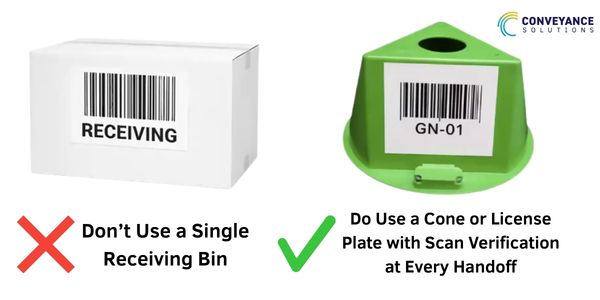
Using a moveable bin can help reduce errors and increase throughput.
A better approach is to receive each pallet or shipment into its own cone or license plate, which is a movable, scannable temporary bin. Every item has a traceable home from the moment it arrives. If a quantity looks off, you know exactly which cone to check.
Actionable tips:
- Receive each pallet into a separate cone or license plate, not a shared master receiving bin.
- Use the license plate structure to track who touched inventory at every stage, from receiving through putaway and picking.
- Review shipment records by cone to quickly identify receiving errors without hunting through one large bin.
Fix #4: Set Up the Wireless Workbench
The Wireless Workbench is a standard feature in P21 that many warehouses ignore. It is also one of the highest-impact changes you can make. The workbench aggregates all open pick tickets the moment they are generated, before anything prints. Workers log in, get automatically assigned tickets, complete them, and receive the next one without walking back to a desk.
For supervisors, the workbench delivers real-time visibility into which orders are being picked, which are staged, which are ready to invoice, and which bins they are sitting in.

You can see individual picker performance, including lines per minute, lines per hour, and daily averages, from a single screen. Get our Free Prophet 21 Portal Download here.
Actionable tips:
- Create picker groups based on equipment certification so workers only receive appropriate tickets.
- Use the workbench to split a large order across multiple pickers by zone instead of printing multiple copies.
- Run the workbench alongside your current paper process at first if you are not ready to go fully digital.
- Set up zone-specific workbenches for dedicated functions like wire cutting or specialized handling.
Fix #5: Clean Up Your Handheld Screens
If a new warehouse employee cannot pick up a scanner and start working without a walkthrough, the screens are the problem. Default P21 picking and putaway screens often include fields that most operations never use, such as serial numbers, lot tracking, and traceable factors.
DynaChanges are P21’s built-in screen customization tool, and they do not require custom development. Removing unused fields, reordering fields so they follow the natural scan sequence, and centering data fields so they are visible on a handheld screen can reduce friction and training time.
Actionable tips:
- Remove fields you do not use. If you do not track lots or serials, take them off the screen.
- Place the field the worker needs to scan directly below the one they just completed to create a simple top-to-bottom flow.
- Center data entry fields so they are visible on handheld devices where off-center text can be hidden by the cursor.
- Test your changes by handing the device to someone unfamiliar with the system and watching where they hesitate.
Why Management Incentives Can Undo Good Configuration
There is one thing you will not find in any P21 setting: your real scorecard. Most warehouses talk about fill rate, accuracy, on-time dispatch, and shrinkage. In practice, the real scorecard often becomes speed at any cost.
When short-term speed is rewarded more than accuracy or compliance, workers skip scans, receive items into the wrong bins, or put product wherever it fits. That behavior is a response to incentives, not a lack of care. Good configuration makes compliance easier, but leadership has to support a balanced scorecard where accuracy and throughput both matter.
Real Results: 3.5x Throughput for a Medical Supply Wholesaler
This is not theory. Conveyance Solutions worked with a U.S.-based medical supply wholesaler operating out of a 350,000 square-foot facility.
When we arrived, 75% of the warehouse operation was manual and paper-based. There was no scan at receiving, putaway, picking, or QC. Orders went through multiple hand-check steps. The same paper pick ticket changed hands four times before an order could be invoiced.
We palletized receiving into individual cones so every item had a traceable chain of custody. We implemented scan-at-every-touchpoint using Scan and Pack so the system handled QC automatically. Wrong items, over-quantities, and under-quantities were flagged on scan instead of being caught by a human reviewer at the end.

The result: 3.5x higher throughput from receiving to ship and the removal of weekend catch-up work. Supervisors had real-time visibility into order status, picker performance, and inventory location. Managers could use data to have productive conversations about what was happening in the warehouse instead of relying on anecdotes.
Score Your Own Warehouse
Give yourself a 1 for each statement that describes your operation today, and a 0 if it does not:
- When someone puts away inventory, they usually decide where it goes.
- Your pick path does not follow a clear, logical sequence through the warehouse.
- No one can answer “what is the status of this pick ticket?” without looking for paper.
- There are handoff points in your process where no scan happens and no system record is created.
- A new employee could not use a scanner without significant instruction.
- The most important informal measure in your warehouse is short-term speed, even if it hurts accuracy or process compliance.
Score 0–1: Your WWMS configuration is in good shape.
Score 2–3: You have specific, addressable gaps and now know where to focus first.
Score 4+: Your warehouse is likely costing you money through lost orders, excess inventory, or headcount doing work the system should handle.
How Conveyance Solutions Can Help
Every fix described in this post exists in your P21 system today. You do not need new software or third-party modules. What is often missing is knowing where to look and how to configure it correctly.
We work with Prophet 21 distributors every day, across industries and warehouse sizes. Whether you need a configuration audit to build a clear baseline, hands-on help setting up the Wireless Workbench, or a longer-term optimization roadmap, we build it with you.
If you are ready to see what your warehouse is capable of, we can help you build a plan that works for your operation and your team.
Contact us to start the conversation with our team.