


If your buyers say Purchase Order Requirements Generation (PORG) suggestions “don’t make sense,” the problem usually isn’t Prophet 21.
It’s the replenishment settings behind those suggestions. The four methods Epicor Prophet 21 (P21) offers are not interchangeable, and applying the wrong one to an item type is one of the quietest ways to accumulate excess inventory, miss reorder points, and lose trust in the system entirely.
The Four P21 Replenishment Methods at a Glance
P21 assigns a replenishment method to each item-location combination in Item Maintenance. That method determines how the PORG engine calculates what to order and when.
Choosing the right method depends on how consistently an item sells, not on which method sounds the most sophisticated.
| Method | Type | Best for | Requires forecasting history? |
|---|---|---|---|
| Up To | Variable | Steady-moving items with consistent demand | Yes (6–12 months minimum) |
| EOQ | Variable | Low-cost, high-volume items where total cost minimization matters | Yes (6–12 months minimum) |
| Min/Max | Fixed | New items, sporadic movers, contractual minimums | No |
| OPOQ | Fixed | Items with fixed order quantities or odd vendor minimums | No |

The fixed methods (Min/Max and OP/OQ) do not account for lead time, demand trends, or any other variable. They do exactly what you tell them.
The variable methods (Up To and EOQ) calculate order points using P21’s forecasting engine, which means they can respond to demand shifts, but only if the underlying settings are maintained.
Min/Max: Simpler to Start, Harder to Sustain
Min/Max is the most common starting point for distributors, and for good reason. It’s straightforward: when net available inventory drops below the Min, P21 suggests an order to bring it back up to the Max.
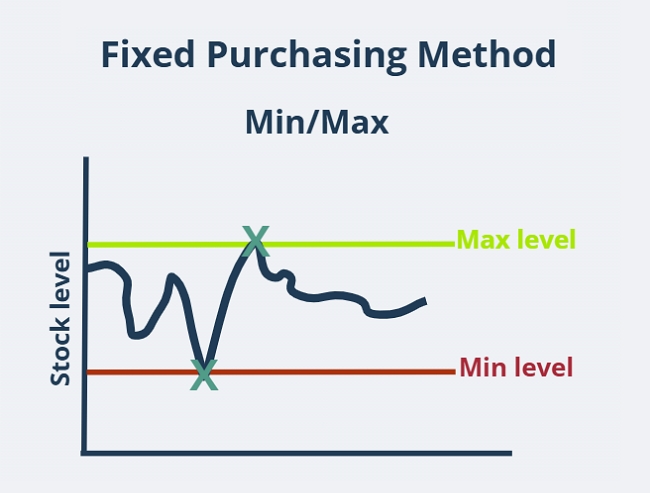
No forecasting history required, no complex configuration. For new items without demand history, sporadic movers, or items where you need to hold a specific quantity regardless of demand, Min/Max is the right choice.
The problem isn’t the method itself. It’s that Min/Max values need to be updated regularly to stay accurate, and most teams don’t do it. P21’s built-in tool for recommending Min/Max values has limited sophistication.
Without a disciplined review process, those values quietly drift out of sync with actual demand patterns. Buyers start overriding suggestions because the numbers don’t feel right, and at that point the system is generating noise rather than guidance.
For distributors managing thousands of SKUs, manually reviewing Min/Max levels on any meaningful schedule is a real operational burden. Some teams use SQL procedures to automate monthly updates to Min/Max levels based on recent usage, which helps. But it requires setup, maintenance, and someone who owns the process.
Up To and EOQ: More Accurate When Configured Correctly
Up To and EOQ are P21’s variable replenishment methods.
Both use the same forecasting engine to calculate an order point based on lead time, review cycle, and safety stock. The order quantity is where they diverge: Up To orders whatever is needed to replenish back to the calculated level, while EOQ applies an Economic Order Quantity formula that factors in carrying cost and ordering cost to find the lowest total cost order size.
For items with consistent demand, these methods produce better suggestions than static Min/Max, because the order point adjusts as demand and lead times shift. But they come with a real prerequisite: the item needs enough usage history for P21’s forecasting formulas to work reliably.
A common benchmark is sales in at least 8 of the previous 12 months. Below that threshold, the forecast becomes unreliable and so do the suggestions. Most practitioners recommend waiting for 6 to 12 months of history before migrating items to Up To or EOQ, and starting the transition in smaller batches so you can verify results before rolling out broadly.
The other important requirement is that forecast usage must be updated monthly via the Demand Year run. If that hasn’t been a regular practice, the dynamic methods are working off stale data, which produces the same problem as stale Min/Max values, just with more complexity underneath it.
How Up To and EOQ Differ
Both methods share the same order point calculation. Where they split is in how the order quantity is determined.

Up To uses ABC classification to drive quantity decisions, meaning the item’s ABC class influences how much to order at a time.
EOQ takes a different approach: it uses the Cost to Order and Cost to Carry fields to calculate the order quantity that minimizes total inventory cost. EOQ tends to drive larger orders because it optimizes for total cost rather than just replenishment timing, which can increase inventory investment.
It is a reasonable fit for low-cost, high-volume items where ordering repeatedly is more expensive than holding extra stock.
What Actually Drives the Buying Calculation
Switching replenishment methods is sometimes framed as a silver bullet. It isn’t. The method matters, but the settings underneath it matter more. Distributors who migrate from Min/Max to Up To and then wonder why suggestions still feel off almost always have the same underlying issues: review cycle is set incorrectly, safety stock hasn’t been configured, or lead time data is lagging.
These three settings do most of the work in P21’s replenishment engine:
- Review cycle is set in Supplier Maintenance and tells P21 how often you plan to buy from a given vendor. It is one of the most frequently misconfigured settings in P21. A practical way to calculate it: determine how many freight-prepaid orders you can place per year based on the supplier’s minimum order threshold, then divide 365 by that number. Set the review cycle at the warehouse level, not just at the supplier level, because purchase volumes differ by location. Review it for key vendors once or twice a year.
- Safety stock applies only to Up To and EOQ items. It has no effect on Min/Max or OPOQ, which surprises teams who assume it provides a buffer regardless of method. Setting safety stock at the ABC class level, rather than item by item, is the most scalable approach. Once that’s configured correctly, you rarely need to touch it per item.
- Lead time in P21 defaults to an average calculated from past receipts. If a vendor’s delivery performance has been variable, that average can lag reality. You can override it by populating the published lead time field in Item Maintenance, which is worth doing for key suppliers where lead time accuracy directly affects fill rates.
When these three settings are dialed in, running Demand Year at month end does most of the ongoing maintenance lift. The system starts producing suggestions that buyers can actually trust.
What to Do If PORG Suggestions Don’t Make Sense
When buyers lose confidence in PORG, the instinct is often to switch methods or look for a more sophisticated tool.

Before going either direction, it’s worth auditing the settings you already have. A misconfigured review cycle or a Min/Max that hasn’t been touched in two years will produce bad suggestions regardless of which method is in use.
A few questions worth asking first:
- Are Min/Max values being reviewed and updated on a regular schedule, or were they set at go-live and left alone?
- Is Demand Year being run monthly? If not, dynamic methods are working off demand data that may be months or years out of date.
- Are review cycles set at the warehouse level for key suppliers, or is there a single default that applies everywhere?
- For Up To items, has safety stock been set at the ABC class level, or left at zero?
For distributors who want more forecasting sophistication than P21’s native engine provides, Epicor offers IP&O as a strategic add-on. It adds consensus-based forecasting, what-if scenario planning, and better handling of intermittent demand.
For teams with the data maturity and budget to support it, it’s worth evaluating. For most mid-market distributors, though, getting the native settings right first is the more practical starting point.
Frequently Asked Questions
Q: What is the difference between Up To and Min/Max in Prophet 21?
A: Min/Max is a fixed method where you manually set the reorder point and target quantity. Up To is dynamic: it calculates the order point using lead time, review cycle, safety stock, and P21’s demand forecast. Up To adjusts as demand changes; Min/Max does not unless you update it manually.
Q: When should I use Min/Max instead of Up To in P21?
A: Use Min/Max for new items without demand history, sporadic movers that sell fewer than 8 months out of 12, items with contractual quantity requirements, or any item where you want to fix inventory levels regardless of actual usage patterns.
Q: Why are my PORG suggestions coming out too high?
A: The most common causes are an oversized review cycle (telling P21 to buy large quantities infrequently), a Min/Max Max value that was never updated after initial setup, or an ABC class Order Up To Level that is overriding the lead time horizon calculation. Check Supplier Maintenance and ABC Class Maintenance first.
Q: Does safety stock apply to all replenishment methods in P21?
A: No. Safety stock only applies to Up To and EOQ items. It has no effect on Min/Max or Order Point/Order Quantity. Any safety stock settings on Min/Max or OP/OQ items are ignored by the replenishment engine.
Q: How often should I review replenishment settings in P21?
A: For Up To and EOQ items, running Demand Year at month end keeps forecast usage current. Review cycles for key vendors should be reviewed once or twice a year. Min/Max values should be reviewed at least quarterly, or monthly if demand patterns are volatile.
Getting More Out of P21’s Replenishment Engine
Replenishment configuration is one of the highest-leverage optimization areas in P21, and one of the most commonly overlooked after go-live. If your team is working around PORG rather than relying on it, the issue is almost always in the settings, not the method.
Conveyance Solutions works with distributors to audit and optimize P21’s purchasing and inventory configuration as part of our Prophet 21 optimization and maintenance practice. If your buying suggestions need a review, talk to our team.